Wednesday, May 25, 2011

jQuery UI Widget : Progressbar

This widget is used to display the progress of a process. The bar is coded to be flexibly sized through CSS and will scale to fit inside it's parent container by default.
This is a determinate progress bar, meaning that it should only be used in situations where the system can accurately update the current status complete.
The following code line is used to place a progress bar inside a element like div :
$("#progressbar").progressbar({ value: 37 }); For options, events ,method and theming click here For options, events ,method and theming click here
EXAMPLE :
progressbar.html
<!DOCTYPE html>
<html>
<head>
<link href="http://ajax.googleapis.com/ajax/libs/jqueryui/1.8
/themes/base/jquery-ui.css" rel="stylesheet" type="text/css"/>
<script src="http://ajax.googleapis.com/ajax/libs/jquery/1.4
/jquery.min.js"></script>
<script src="http://ajax.googleapis.com/ajax/libs/jqueryui/1.8
/jquery-ui.min.js"></script>

<script>
$(document).ready(function() {
$("#progressbar").progressbar({ value: 37 });
});
</script>
</head>
<body style="font-size:62.5%;">

<div id="progressbar"></div>

</body>
</html>
Output :

Download Source Code

jQuery UI Widget : Slider

The jQuery UI Slider plugin makes selected elements into sliders. There are various options such as multiple handles, and ranges. The handle can be moved with the mouse or the arrow keys.
You can implement slider as :
$("#slider").slider(); here 'slider' is the div element name.
For options, events ,method and theming click here
EXAMPLE :
slider.html
<!DOCTYPE html>
<html>
<head>
  <link href="http://ajax.googleapis.com/ajax/libs/jqueryui/
1.8/themes/base/jquery-ui.css" rel="stylesheet" type="text/css"/>
        
<script src="http://ajax.googleapis.com/ajax/
libs/jquery/1.4/jquery.min.js"></script>
        
<script src="http://ajax.googleapis.com/ajax/
libs/jqueryui/1.8/jquery-ui.min.js"></script>
        
<style type="text/css">
 #slider { margin: 10px; }
</style>
<script>
  $(document).ready(function() {
    $("#slider").slider();
  });
</script>
</head>
<body style="font-size:62.5%;">
  
<div id="slider"></div>

</body>
</html>
Output :

Download Source Code

jQuery UI Widget : Tabs

Tabs are generally used to break content into multiple sections that can be swapped to save space, much like an accordion.
By default a tab widget will swap between tabbed sections onClick, but the events can be changed to onHover through an option. Tab content can be loaded via Ajax by setting an href on a tab.
You can implement tab as :
$("#tabs").tabs(); EXAMPLE :
tabs.html
<!DOCTYPE html>
<html lang="en">
<head>
<meta charset="UTF-8" />
<title>jQuery UI Tabs</title>
<link type="text/css" href="tab/jquery-ui-1.8.4.custom.css" rel="stylesheet" />
<script type="text/javascript" src="jquery-1.4.2.js"></script>
<script type="text/javascript" src="tab/jquery-ui-1.8.4.custom.min.js"></script>
<script type="text/javascript">
$(function() {
$("#tabs").tabs();
});
</script>
</head>
<body>

<div class="demo">

<div id="tabs">
<ul>
<li><a href="#tabs-1">jQuery</a></li>
<li><a href="#tabs-2">Ajax</a></li>
<li><a href="#tabs-3">Java Script</a></li>
</ul>
<div id="tabs-1">
<p>jQuery is a cross-browser JavaScript library designed to simplify the client-side scripting of HTML.It was released in January 2006 at BarCamp NYC by John Resig. Used by over 31% of the 10,000 most visited websites, jQuery is the most popular JavaScript library in use today.
jQuery is free, open source software, dual-licensed under the MIT License and the GNU General Public License, Version jQuery's syntax is designed to make it easier to navigate a document, select DOM elements, create animations, handle events, and develop Ajax applications. jQuery also provides capabilities for developers to create plugins on top of the JavaScript library. Using these facilities, developers are able to create abstractions for low-level interaction and animation, advanced effects and high-level, theme-able widgets. This contributes to the creation of powerful and dynamic web pages.</p>
</div>
<div id="tabs-2">
<p>Ajax is a group of interrelated web development techniques used on the client-side to create interactive web applications. With Ajax, web applications can retrieve data from the server asynchronously in the background without interfering with the display and behavior of the existing page. The use of Ajax techniques has led to an increase in interactive or dynamic interfaces on web pages. Data is usually retrieved using the XMLHttpRequest object. Despite the name, the use of XML is not actually required, nor do the requests need to be asynchronous.</p>
</div>
<div id="tabs-3">
<p>JavaScript is an implementation of the ECMAScript language standard and is typically used to enable programmatic access to computational objects within a host environment. It can be characterized as a prototype-based object-oriented[5] scripting language that is dynamic, weakly typed and has first-class functions. It is also considered a functional programming language like Scheme and OCaml because it has closures and supports higher-order functions.</p>
</div>
</div>

</div>
<font color="#FF4500">
<p>Click tabs to See Content of Title</p>
</font>

</body>
</html>
Output :

Download Source Code

jQuery UI Widget : Dialog

This widget is used to create a floating window that contains a title bar and a content area. The dialog window can be moved, resized and closed with the '+' icon by default.
f the content length exceeds the maximum height, a scrollbar will automatically appear.
A bottom button bar and semi-transparent modal overlay layer are common options that can be added.
A call to $(foo).dialog() will initialize a dialog instance and will auto-open the dialog by default. If you want to reuse a dialog, the easiest way is to disable the "auto-open" option with: $(foo).dialog({ autoOpen: false }) and open it with $(foo).dialog('open'). To close it, use $(foo).dialog('close').
To create a dialog box containing text of a element like div, we use :
 $("#dialog").dialog();

For options, events ,method and theming click here
EXAMPLE :
dialog.html
<!DOCTYPE html>
<html>
<head>
<link href="http://ajax.googleapis.com/ajax/libs
/jqueryui/1.8/themes/base/jquery-ui.css" rel="stylesheet" type="text/css"/>
<script src="http://ajax.googleapis.com/ajax/libs/jquery/1.4/jquery.min.js">
</script>
<script src="http://ajax.googleapis.com/ajax/libs/jqueryui/1.8/jquery-ui.min.js">
</script>
<script>
$(document).ready(function() {
$("#dialog").dialog();
});
</script>
</head>
<body style="font-size:62.5%;">

<div id="dialog" title="Dialog Title">This is a dialog box</div>

</body>
</html>
Output :

Download Source Code

jQuery UI Widget : Datepicker

You can datepicker to your web page for inputting date. The language and date format can be customize. By default, the datepicker calendar opens in a small overlay on Focus and closes automatically on Blur or when a date is selected.
The datepicker is very useful on the website. In this example you will learn how to use jQuery datepicker component.
You can use keyboard shortcuts to drive the datepicker:
  • page up/down - previous/next month
  • ctrl+page up/down - previous/next year
  • ctrl+home - current month or open when closed
  • ctrl+left/right - previous/next day
  • ctrl+up/down - previous/next week
  • enter - accept the selected date
  • ctrl+end - close and erase the date
  • escape - close the datepicker without selection
For options, events ,method and theming click here
EXAMPLE :
datepicker.html
<html>
<head>
<meta http-equiv="Content-Type" content="text/html;charset=utf-8">
<title>jQuery Datepicker</title>
<style type="text/css">
@import "DatePicker/flora.datepick.css";
</style>
<script type="text/javascript" src="jquery-1.4.2.js"></script>
<script type="text/javascript" src="DatePicker/jquery.datepick.js"></script>
<script type="text/javascript">
$(function() {
$('#popupDatepicker').datepick();

});
</script>
</head>
<body bgcolor="#ADFF2F">
<h1><font color="green">jQuery popup Date picker</font></h1>
<font color="green">
<p>Enter Date &nbsp;<input type="text" id="popupDatepicker"></p>
</font>
</body>
</html>
Output :
When you click inside input box :

Download Source Code

Query UI Widget : Autocomplete

Using autocomplete widget , you can add autocomplete feature to your input  field. In this field when you will start type something , it will provide a list of related possible values (starting from that letter which you already typed). When you click on any of these , it will auto complete the remaining text.
For options, events ,method and theming click here
EXAMPLE :
autocompleteUI.html
<!DOCTYPE html>
<html>
<head>
<link href="http://ajax.googleapis.com/ajax/libs/jqueryui
/1.8/themes/base/jquery-ui.css" rel="stylesheet" type="text/css"/>
<script src="http://ajax.googleapis.com/ajax/libs/jquery/1.4
/jquery.min.js"></script>
<script src="http://ajax.googleapis.com/ajax/libs/jqueryui/1.8
/jquery-ui.min.js"></script>

<script>
$(document).ready(function() {
$("input#autocomplete").autocomplete({
source: ["c++", "java", "php", "coldfusion", "javascript", "asp", "ruby"]
});
});
</script>
</head>
<body style="font-size:62.5%;">
<h3><font color="red">Fill the below Field</font></h3>
Type your language proficiency :
<input id="autocomplete" />
</body>
</html>
Output :
When you type something , for ex. java , it will show :

Download Source Code

jQuery UI Widget : Accordion

Using accordion widget , you can create multiple content panel, but doesn't allow more than one content panel to be open at the same time.
The markup of your accordion container needs pairs of headers and content panels :
<div id="accordion">
    <h3><a href="#">First header</a></h3>
    <div>First content</div>
    <h3><a href="#">Second header</a></h3>
    <div>Second content</div>
</div>
For options, events ,method and theming click here EXAMPLE :
accordion.html
<!DOCTYPE html>
<html>
<head>
<link href="http://ajax.googleapis.com/ajax/libs/jqueryui/1.8/themes/base
/jquery-ui.css" rel="stylesheet" type="text/css"/>
<script src="http://ajax.googleapis.com/ajax/libs/jquery/1.4/jquery.min.js">
</script>
<script src="http://ajax.googleapis.com/ajax/libs/jqueryui/1.8/jquery-ui.min.js">
</script>

<script>
$(document).ready(function() {
$("#accordion").accordion();
});
</script>
</head>
<body style="font-size:62.5%;">

<div id="accordion">
<h3><a href="#">Part 1 : John Resig</a></h3>
<div>
<p>
John Resig is a JavaScript Evangelist for the Mozilla Corporation and the creator
and lead developer of the jQuery JavaScript library. This library's goal is to simplify
the process of writing JavaScript code that is compatible with all web browsers.For
 his work on jQuery he was inducted into the Rochester Institute of Technology's
Innovation Hall of Fame on April 30, 2010.
</p>
</div>
<h3><a href="#">Part 2 : Resig 's achievment</a></h3>
<div>
<p>
Resig has also been involved in the creation of several other JavaScript libraries including
FUEL (for Firefox plugin development),Processing.js (for visual effects) and Sizzle (for CSS selectors).
"The Google Address Translation, was developed by John Resig and gives Google Maps the ability to
convert any US Postal Address into Latitude/Longitude coordinates," according to WebProNews
</p>
</div>
<h3><a href="#">Part 3 : jquery</a></h3>
<div>
<p>
jQuery is a cross-browser JavaScript library designed to simplify the client-side scripting of HTML.
 It was released in January 2006 at BarCamp NYC by John Resig. Used by over 31% of the 10,000
 most visited websites, jQuery is the most popular JavaScript library in use today.
</p>
<ul>
<li>List item one</li>
<li>List item two</li>
<li>List item three</li>
</ul>
</div>
<h3><a href="#">Part 4 : jQuery plugin</a></h3>
<div>
<p>
Because of jQuery's architecture, other developers can use its constructs to create plug-in code to extend
 its functionality. Currently there are thousands of jQuery plug-ins available on the web[11] that cover a
wide range of functionality such as Ajax helpers, webservices, datagrids, dynamic lists, XML and XSLT tools,
 drag and drop, events, cookie handling, modal windows, even a jQuery-based Commodore 64 emulator
</p>
<p>
An important source of jQuery plug-ins is the Plugins sub-domain of the jQuery Project website. There are
 alternative plug-in search engines that take more specialist approaches, such as only listing plug-ins that meet
certain criteria (e.g. those that have a public code repository).
</p>
</div>
</div>

</body>
</html>
Output :

Download Source Code

jQuery Utility Functions

In this section we are discussing about jQuery Utility Functions. Understanding these functions are important as you will have to use these funtions very frequently while writing your jQuery application.
Here is the list of jQuery Utility Functions:
.clearQueue()
This function is used to remove all the functions from the queue that have not been executed.

jQuery.contains()
The jQuery.contains() function is used to check if a DOM node is within another DOM node.

jQuery.data()
The jQuery.data() function is used to add data of any type to a DOM element..

.dequeue()
The .dequeue() function is used to remove the next function on the queue.

jQuery.dequeue()
The jQuery.dequeue() is used to execute the next function on the queue for the matched element.

jQuery.each()
The jQuery.each() function is not same as  .each(), which is used to iterate over the jQuery objects. The  jQuery.each() iterates through the array displaying each number as both a word and numeral.
 
jQuery.extend()
The jQuery.extend() function merge the contents of two or more objects together into the first object.
 
jQuery.globalEval()
Execute some JavaScript code globally.
 
jQuery.grep()
The jQuery.grep() function is used to find the elements of an array which satisfy a filter function. The original array is not affected.
 
jQuery.inArray()
The jQuery.inArray() function searches for a specified value within an array and return its index (or -1 if not found).
 
jQuery.isArray()
The jQuery.isArray() function is used to determine whether the argument is an array.
 
jQuery.isEmptyObject()
The jQuery.isEmptyObject() function is used to check to see if an object is empty (in order words contains no properties).
 
jQuery.isFunction()
The jQuery.isFunction() is used to determine if the argument passed is a Javascript function object.
 
jQuery.isPlainObject()
The function jQuery.isPlainObject() is used to find if an object is a plain object (created using "{}" or "new Object").
 
jQuery.isXMLDoc()
The jQuery.isXMLDoc() function is used to find if a DOM node is within an XML document (or is an XML document).
 
jQuery.makeArray()
The function jQuery.makeArray() is used to convert an array-like object into a true JavaScript array.
 
jQuery.map()
The function jQuery.map() translates all items in an array or array-like object to another array of items.
 
jQuery.merge()
The function jQuery.merge() merge the contents of two arrays together into the first array.
 
jQuery.noop()
The jQuery.noop() is an empty function.
 
jQuery.parseJSON
The jQuery.parseJSON function takes a well-formed JSON string as parameter and then returns the resulting JavaScript object.
 
jQuery.proxy()
The jQuery.proxy() function Takes a function and returns a new one that will always have a particular context.
 
.queue()
It shows the queue of functions to be executed on the matched elements.
 
jQuery.queue()
It shows the queue of functions to be executed on the matched element.
 
jQuery.removeData()
This function is used to remove a previously-stored piece of data.
 
jQuery.support
Properties of the Global jQuery Object.
 
jQuery.trim()
It is used to remove the whitespace from the beginning and end of a string.
 
jQuery.unique()
The jQuery.unique() function sorts an array of DOM elements, in place, with the duplicates removed.

jQuery jquery with other Libraries

There are many JavaScript libraries to help the developer to develop web applications. These libraries are designed to solve a particular problem efficiently. There may be some requirement of using these different libraries with jQuery. So, you may find incompatibility using these libraries with jQuery. In this section we are discussing the ways to use jQuery with other libraries. This issue comes as other libraries also uses $ to access the function of variable name. In this example you will see how to use $ to access both jQuery and other libraries functions and variables.
Using jQuery with other Libraries:
Let's see how we can use jQuery with other libraries.

In your application if there is requirement of including other libraries such as  prototype.js, YUI or mootools with jQuery, you can use the .noConflict() method of jQuery.
In jQuery $ is an alias for jQuery, so you can use jQuery() for accessing the jQuery methods. The following code example shows how you can use other libraries with jQuery:
<html>
<head><title>jQuery Example</title>
<script type="text/javascript" src="prototype.js"></script>
<script type="text/javascript" src="jquery-1.4.2.min.js"></script>
<script>
   jQuery.noConflict(); //For using other libraries
  // Use jQuery using function jQuery(...)
  jQuery(document).ready(function(){
   //write your code here
   });
  // Use Prototype with $(...), etc.
   $('messagebox').hide();
</script>

</head>
<body><div id="messagebox"></div></body>
</html>

How jQuery Works?

This section we will see how jQuery works with the help of simple program. This tutorial will give you basic introduction to the jQuery and explain the concepts required to understand.
The jQuery library helps the developer to develop rich internet applications. This is one of the most used framework on the web. Its easy to learn and use language. Here is the highlights of jQuery:
  • jQuery is a JavaScript based Library that runs in browser. Its is client side ajax framework.
  • jQuery simplifies the development of ajax based application using JavaScript programming language.
  • jQuery is easy to learn and use language. Programmer's can learn it easily.
  • Lot's of support. There are many examples and tutorials available on internt.
The jQuery is designed to do more work in less coding. It's very easy to work with jQuery. It support all the serverside web application development technologies. You can use JSP,Servlets, Struts, Spring MVC, ASP, .NET, CGI, PHP, Perl etc. as server-side language and user jQuery to dynamically fetch data from the server.

So, jQuey is very useful tool. Let's see how it works and we can use it in programming.
Traditionally developer's are using Window.onload() function to initiate some action on page load. There is one drawback with this function. It does not fires until all the images including the advertisement banner are loaded. So, window.onload() can be painfully slow. The jQuery provides the solution for this problem. The $(document).ready(function(){}) solves the issue. It is fired once the Document Object Model is ready. So, you can use this to run any type of JavaScript to suite your business needs.
Here is the code that will display alert message once Document Object Model is ready:
$(document).ready(function(){
// Your code here...
alert("Hello");
});


Adding jQuery to a page:
The jQuery is distributed as js file. It can be downloaded from http://docs.jquery.com/Downloading_jQuery. Download jquery-1.4.2.min.js and then place in your project folder. To include in the html file use the following code:
<script type="text/javascript" src="jquery-1.4.2.min.js"></script>

This will include the jQuery library into your webpage. Then add the following code into JavaScript block of the html page:
 $(document).ready(function(){
// Your code here
});
This method will be called once Document tree is ready. Here you can add any JavaScript function. Following example shows the hello world alert message:
I
Hello world alert box example(HelloAlert.html)
<html>
<head>
<title>jQuery Hello World Alert box</title>
 
<script type="text/javascript" src="jquery-1.4.2.js"></script>
 
</head>
 <script type="text/javascript">
$(document).ready(function(){
$("#cl").click(function(){
alert("HELLO WORLD!");
});
});
</script>
<body>
<font color="red">CLICK BELOW BUTTON TO SEE ALERT BOX</font>
<br>
<br>
<button id="cl">Click Me</button>
</body>
</html>
The following line includes the jQuery library into webpage:
<script type="text/javascript" src="jquery-1.4.2.js"></script>

jQuery Hello World example

This section we are going to create our first jQuery application called "Hello World jQuery". This application will simply display "Hello World !! (display due to jQuery)" message in browser.
After completing the example you will be able include the jQuery library in your application and use it to do simple functions.
Let's start developing the Hello World application in jQuery.

Setting up jQuery

For start , we require the jQuery library. You can get it using the following link :
http://code.jquery.com/jquery-1.4.2.js
When you click on the following link it will open a page containing jQuery library script. This file is around 70kb.You need to save this as "jquery-1.4.2.js". Now we are ready to use jQuery inside your html page.
Hello World Example(HelloWorld.html)
<html>
<head>
<title>jQuery Hello World</title>
 
<script type="text/javascript" src="jquery-1.4.2.js"></script>
 
</head>
 
<script type="text/javascript">
 
$(document).ready(function(){
 $("#flag").html("Hello World !! (display due to jQuery)");
});
 
</script>
<body>
<font color=red> 
Hello World !! (display due to HTML)
</font>
<font color=blue>
<div id="flag">
</div>
</font>
</body>
</html>
Description of the program
The first and most important thing is to include jQuery library  as:
<script type="text/javascript" src="jquery-1.4.2.js"></script>
If you are using the above tag as it is , you need to save the "jquery-1.4.2.js" in the same folder in which you saved your html page. You can also save it in another folder but in that case you need to provide the relative path.
Look precisely the below code :
<script type="text/javascript">
 
$(document).ready(function(){
 $("#flag").html("Hello World !! (display due to jQuery)");
});
 
</script>
For using jQuery script ,we write it inside <script> tag. The below code checks whether the page loading is finished (DOM elements are ready or fully loaded) and if page loading is finished then it executes the code in the block.
$(document).ready(function(){
// Your code here
});


The code given below set the message at div "flag" in html form :
$("#flag").html("Hello World !! (display due to jQuery)");});
OUTPUT

When page loaded it will show :

jQuery Features

jQuery have lot of functionalities but some of the key features are given below :
Selection of DOM elements :
The jQuery selector provide us capability to select DOM elements so that we can add functionality to them using methods of jQuery. It is using CSS 3.0 syntax which provide us freedom to select one or more elements. Using CSS , you can select element by id, class and collaborate with events to increase it's functionality.
The wrapped set 
The selected elements reside inside a object known as wrapped set. It contain all the selected DOM elements, it has array like structure. You can traverse through this like an array and can select elements using index.
Events 
jQuery provide simplified event handling, You can easily bind and unbind events and for supported browsers it also provide a normalized event model due to this it is very easy to handle events.When any event occurs , it is called under the context of the event that triggered it.
Extensibility through plug-ins
The jQuery architecture provide us freedom to extend functionality using plug-ins . The plug-ins are easy to use and easy to clip with your page. You just need to set parameters to use these jQuery plug-ins and also need to include plug-in file. Some the main jQuery plug-ins are :
1.XML and XSLT tools
2.cookie handling
3.datagrids
4.drag and drop events.
5.modal windows
6.dynamic lists
7.webservices
8.Ajax helpers
9.even a jQuery-based Commodore 64 emulator.
Cross-browser support
In JavaScript, the DOM implementations for event handling vary considerably between browsers. Where as jQuery providing a normalized event model for all supported browsers that makes it very easy to handle events.
Ajax support
AJAX stands for Asynchronous JavaScript and XML . Using AJAX we can connect to database and also can fetch the data from the server's database without refreshing the page. JQuery  have very effective AJAX methods library to extend the functionality of AJAX.
Compatibility with languages
The jQuery script can be used with nearly all the web languages. Some of Frequently used languages with jQuery are given below:
 1.PHP
2.JSP
3.ASP
4.Servlet
5.CGI

What is jQuery?

jQuery is great library for developing ajax based application. jQuery is great library for the JavaScript programmers, which simplifies the development of web 2.0 applications. You can use jQuery to develop cool web 2.0 applications. jQuery helps the programmers to keep code simple and concise. The jQuery library is designed to keep the things very simple and reusable.
jQuery library simplifies the process of traversal of HTML DOM tree. You can use jQuery to handle events, perform animation, and add the ajax support into your web applications with ease.
Why jQuery?
You can use simple JavaScript to perform all the functions that jQuery provides. Then why jQuery? The jQuery library is providing many easy to use functions and methods to make rich applications. These functions are very easy to learn and even a designer can learn it fast. Due to these features jQuery is very popular and in high demand among the developers. You can use jQuery in all the web based applications irrespective of the technology.
jQuery is java script and can be used with JSP, Servlets, ASP, PHP, CGI and almost all the web programming languages.
The jQuery code is very simple and easy to learn.
Here are the features of jQuery
  • DOM element selections functions
  • DOM traversal and modification
  • Events
  • CSS manipulation
  • Effects and animations
  • Ajax
  • Extensibility
  • Utilities - such as browser version and the each function.
  • JavaScript Plugins
How much time is required to learn jQuery?
You can learn jQuery in a day and master it within 2-3 days. There are so many features available with jQuery and you may spend months to explore these features.
We have spent huge time in exploring the jQuery and developing almost all the examples that can be developed with jQuery. So, explore our huge collection of jQuery tutorials and examples. Please continue reading the tutorials.

jQuery tutorial for beginners

jQuery tutorial for absolute beginners.
This is complete jQuery tutorial for beginners and is developed for the absolute beginners trying to learn jQuery in quickest possible time. This tutorial will help you in getting started with jQuery in very short time.
Let's get started with the jQuery tutorial for absolute beginners.
In this tutorial you will learn how to download jQuery library and then add it to your project and develop simple program that shows alert message on the page load.
Step 1: Downloading jQuery library
The jQuery library can be downloaded from http://code.jquery.com/jquery-1.4.2.min.js. Download the file and save it a directory on your hard disk.
Step 2: Adding jQuery library to web page
Following line is required to add the jQuery library in the web page.
<script type="text/javascript" src="jquery-1.4.2.min.js"></script>
Step 3: Adding jQuery code to show alert message
Add the following code to display the alert message on page load:
<Script language="JavaScript">
$(document).ready(function() {
alert("jQuery tutorial for beginners Example");
});

</Script>
The $(document).ready(function() {} function is called once document dom tree is ready. An in this function we have added the JavaScript alert function to display the alert message.

Tuesday, May 24, 2011

Introducing ASP.NET MVC 3 (Preview 1)

This morning we posted the “Preview 1” release of ASP.NET MVC 3.  You can download it here.
We’ve used an iterative development approach from the very beginning of the ASP.NET MVC project, and deliver regular preview drops throughout the development cycle.  Our goal with early preview releases like the one today is to get feedback – both on what you like/dislike, and what you find missing/incomplete.  This feedback is super valuable – and ultimately makes the final product much, much better.

ASP.NET MVC 3

As you probably already surmised, ASP.NET MVC 3 is the next major release of ASP.NET MVC. 
ASP.NET MVC 3 is compatible with ASP.NET MVC 2 – which means it will be easy to update projects you are writing with MVC 2 to MVC 3 when it finally releases.  The new features in MVC 3 build on top of the foundational work we’ve already done with the MVC 1 and MVC 2 releases – which means that the skills, knowledge, libraries, and books you’ve acquired are all directly applicable with the MVC 3 release.  MVC 3 adds new features and capabilities – it doesn’t obsolete existing ones.
ASP.NET MVC 3 can be installed side-by-side with ASP.NET MVC 2, and you can install today’s “Preview 1” release on your machine without it impacting existing MVC 2 projects you are working on (they will continue to use MVC 2 unless you explicitly modify the projects to retarget them to MVC 3).  When you install “Preview 1” you will have a new set of ASP.NET MVC 3 project templates show up within Visual Studio 2010’s “New Project” dialog – choosing one of those when you create a new project will cause it to use MVC 3.
Below are details about some of the new features and capabilities in today’s “Preview 1” release.  Unless otherwise noted, all of the features I describe are enabled with the preview build you can download and use today.  More ASP.NET MVC 3 features will come in future preview refreshes as we flesh out the product more and iterate on your feedback.

View Improvements

ASP.NET MVC 3 “Preview 1” includes a bunch of view-specific improvements.

Add->View Dialog

“Preview 1” includes a new “Add->View” dialog that makes it easy for you to choose the syntax you want to use when you create new view template files.  It allows you to select any of of the available view engines you have installed on your machine – giving you the ability to use whichever view templating approach feels most natural to you:
AddView9
There are a bunch of great open source view template engines out there (including Spark, NHaml, NDjango and more) – it is now much easier for them to integrate into Visual Studio.
Today’s “Preview 1” build of ASP.NET MVC 3 comes with two view-engine already pre-enabled within the dialog: ASPX and Razor. 

New “Razor” View Engine

Earlier this month I blogged about the new “Razor” view engine we’ve been working on.  Based on the comments in the post, a lot of people are eagerly waiting to use it.  The good news is that you can start using it with today’s “Preview 1” release.
Simple Razor Example
Let’s build a super-simple store site that lists product categories, and allows visitors to click the categories to see a listing of products within them.  You can download a completed version of this sample here.
image
Below is a StoreController class that implements the two action methods (“Index” and “Browse”) needed to build the above scenario:
image
We’ll use the new “Razor” view engine to implement the view templates for our StoreController.
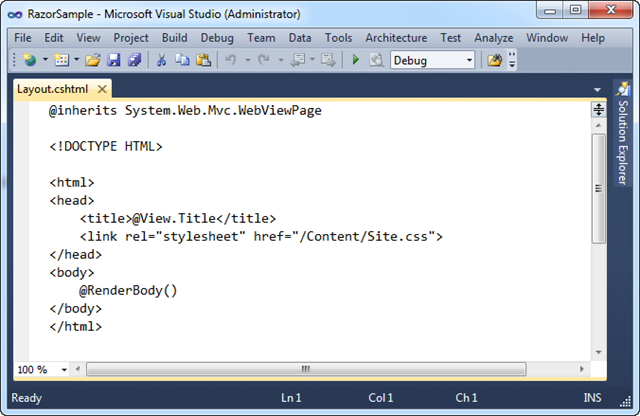
Below is the “Layout.cshtml” layout-page that will define the common layout UI we want across our site.  The “RenderBody()” method indicates where view templates that are based on this master layout file should “fill in” the body content:
image
Below is the view template for the Index action.  It is based on the above layout page, and outputs a <ul> list of category names: 
image
The template above is using the standard Html.ActionLink() helper method in ASP.NET MVC to render a hyperlink that links to the “Browse” action method of our StoreController.  All of existing HTML helper methods in ASP.NET MVC work in “Razor” views – this is true both for the HTML helper methods built-into ASP.NET MVC, as well as those built by others (including vendors and the MvcContrib project).
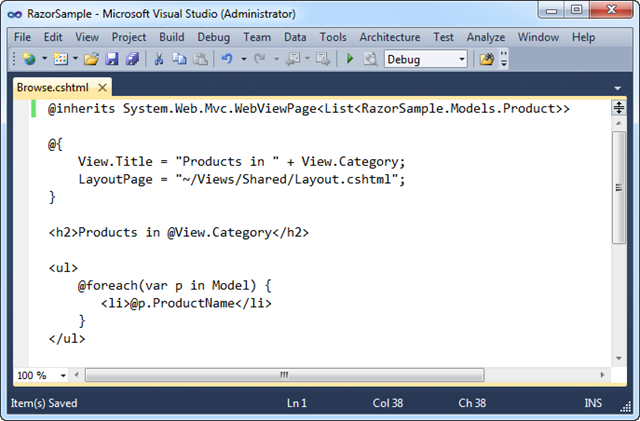
Below is the view template for the Browse action.  It lists the products within a specific category:
image
Notice above how we are using the “Model” property within our foreach statement to access the strongly-typed List of products we passed from our Controller.  We are doing this just like we would within .aspx view templates.  Razor also supports a “View” property which allows us to access un-typed “ViewData” passed to the view template.  “View” is a dynamic property (a new feature of .NET 4) – which gives us a slightly cleaner syntax when accessing ViewData.  Instead of writing ViewData[“Cateogry”] we can now just write View.Category.
Clean and Concise
The code in the screen-shots above contains everything we need to write to implement our Controller + Views.  “Razor” helps make view templates clean and concise, and I think you’ll find it enables a very fluid coding workflow. Read my “Razor” blog post from earlier in the month to learn more about the syntax and understand how it works.  You can download a running version of the above sample here.
Code Intellisense and Colorization
One of the things you might have noticed from the screen-shots above is that “Razor” file colorization and code intellisense is not yet supported in Visual Studio with today’s “Preview 1” release.  We will be enabling full code intellisense and colorization with a future preview refresh.  The VS 2010 editor will support Razor file intellisense for C#/VB code, as well as for HTML/CSS/JavaScript. 
Other Improvements in the Future
Three other enhancements we are working to enable in a future preview refresh are:
  • The ability to use a @model statement at the top of a “Razor” file instead of having to explicitly inherit from a base class.  This reduces the code and simplifies it.  
  • The ability to specify a default LayoutPage for the site to avoid having to explicitly set it within each view template.  This further reduces the code within the view template, and makes your code more DRY.
  • The ability to unit-test individual “Razor” template files without having to run the application or launch a web-server.
With these first two changes the above Browse template will be able to be written as simply:
image
The above template syntax will be supported in a future preview refresh.  Full colorization and code-intellisense will be provided within the editor.

Controller Improvements

ASP.NET MVC 3 “Preview 1” includes several nice controller-specific enhancements.

Global Filters

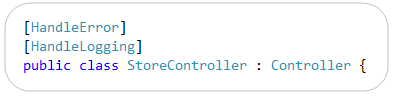
ASP.NET MVC supports the ability to declaratively apply “cross-cutting” logic using a mechanism called “filters”.  You can specify filters on Controllers and Action Methods today using an attribute syntax like so:
image
Developers often want to apply some filter logic across all controllers within an application.  ASP.NET MVC 3 now enables you to specify that a filter should apply globally to all Controllers within an application.  You can now do this by adding it to the GlobalFilters collection.  A RegisterGlobalFilters() method is now included in the default Global.asax class template to provide a convenient place to do this (it is then called by the Application_Start() method):
image
The filter resolution logic in MVC 3 is flexible so that you can configure a global filter that only applies conditionally if certain conditions are met (for example: debugging is enabled, or if a request uses a particular http verb, etc).  Filters can also now be resolved from a Dependency Injection (DI) container – more on that below.

New Dynamic ViewModel Property

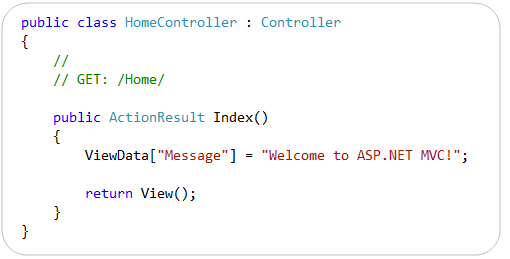
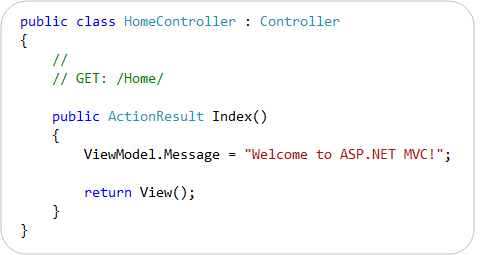
ASP.NET MVC Controllers have supported a “ViewData” property that enables you to pass data to a view template using a late-bound dictionary API.  For example:
image
The “ViewData” API is still supported in ASP.NET MVC 3.  MVC 3 augments it, though, with a new “ViewModel” property on Controller that is of type “dynamic” – and which enables you to use the new dynamic language support within VB and C# to pass ViewData items using a slightly cleaner syntax than the current dictionary API.  Now you can alternatively write the following code to achieve the same result as above:
image
You do not need to define any strongly-typed classes to use the ViewModel property.  Because it is a “dynamic” property you can instead just get/set properties on it and it will resolve them dynamically at runtime.  It internally stores the property name/value pairs within the ViewData dictionary.

New ActionResult Types

ASP.NET MVC 3 “Preview 1” includes several new ActionResult types and corresponding helper methods.
HttpNotFoundResult
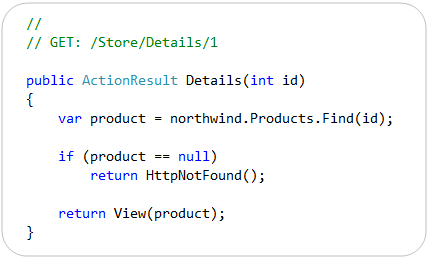
The new HttpNotFoundResult class is used to indicate that a resource requested by the current URL was not found. It returns a 404 HTTP status code to the calling client. You can optionally use the new HttpNotFound() helper method on Controller to return an instance of this action result type, as shown in the following example:
image
Permanent Redirects
The HttpRedirectResult class has a new Boolean “Permanent” property that is used to indicate whether a permanent redirect should occur. A permanent redirect uses the HTTP 301 status code.  In conjunction with this change, the Controller class now has three new methods for performing permanent redirects: RedirectPermanent(), RedirectToRoutePermanent(), and RedirectToActionPermanent().  These methods return an instance of HttpRedirectResult with the Permanent property set to true.
HttpStatusCodeResult
The new HttpStatusCodeResult class can be used to set an explicit response status code and description. 

JavaScript and AJAX Improvements

ASP.NET MVC 3 includes built-in JSON binding support that enables action methods to receive JSON-encoded data and model-bind it to action method parameters. 
To see this feature in action, consider the jQuery client-side JavaScript below.  It defines a “save” event handler that will be invoked when a save button is clicked on the client.  The code within the event handler constructs a client-side JavaScript “product” object with three fields whose values are retrieved from HTML input elements.  It then uses jQuery’s .ajax() method to POST a JSON based request containing the product to a /Store/UpdateProduct URL on the server:
image
ASP.NET MVC 3 now enables you to implement the /Store/UpdateProduct URL on the server using an action method like below:
image
The UpdateProduct() action method above accepts a strongly-typed Product object as a parameter.  ASP.NET MVC 3 can now automatically bind the incoming JSON post values to the .NET Product type on the server – without you having to write any custom binding or marshalling logic.  ASP.NET MVC’s built-in model and input validation features all work as you’d expect with this.
We think this capability will be particularly useful going forward with scenarios involving client templates and data binding (like I’ve previously blogged about here).  Client templates will enable you to format and display a single data item or set of data items by using templates that execute on the client.  ASP.NET MVC 3 will enable you to easily connect client templates with action methods on the server that return and receive JSON data.
Other JavaScript/AJAX Improvements in the Future
Future preview refreshes of ASP.NET MVC 3 will include better support for unobtrusive JavaScript.  ASP.NET MVC 3 will also directly support the jQuery Validation library from within its built-in validation helper methods.

Model Validation Improvements

ASP.NET MVC 2 came with significant model validation improvements.  You can read my previous blog post to learn more about them.
ASP.NET MVC 3 extends this work further, and adds support for several of the new validation features introduced within the System.ComponentModel.DataAnnotations namespace in .NET 4. In particular:
  • MVC 3 supports the new .NET 4 DataAnnotations metadata attributes such as DisplayAttribute.
  • MVC 3 supports the improvements made to the ValidationAttribute class in .NET 4.  The ValidationAttribute class was improved in .NET 4 to support a new IsValid overload that provides more information about the current validation context, such as what object is being validated.  This enables richer scenarios where you can validate the current value based on another property of the model. 
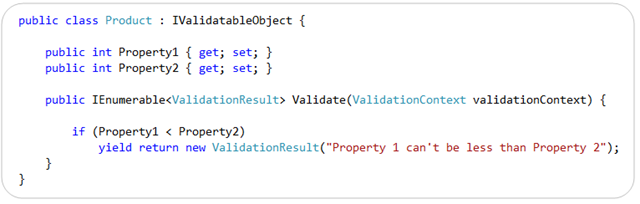
  • MVC 3 supports the new IValidatableObject interface introduced in .NET 4.  The IValidatableObject interface enables you to perform model-level validation, and enables you to provide validation error messages specific to the state of the overall model, or between two properties within the model. 
Below is an example of using the IValidatableObject interface built-into .NET 4 to implement a custom validation method on a class.  This method can apply validation rules across multiple properties and yield back multiple validation errors (and optionally include both an error message like below as well as a list of property names that caused the violation):
image
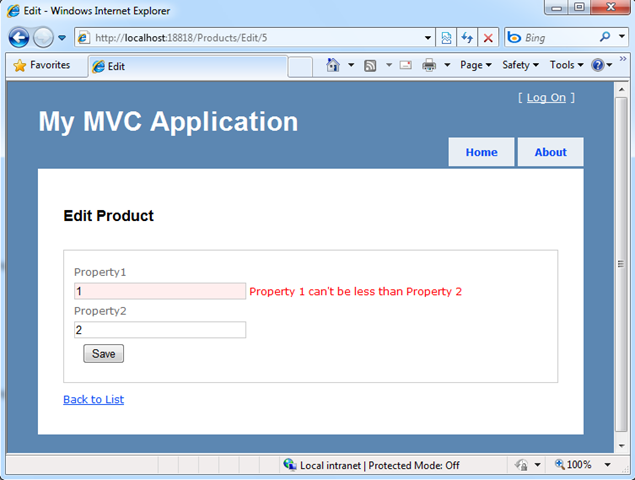
ASP.NET MVC 3 now honors the IValidateObject interface when model binding (in addition to all of the other validation approaches it already supported with MVC 2), and will retrieve validation errors from it and automatically flag/highlight impacted fields within a view using the built-in HTML form helpers:
image
ASP.NET MVC 3 also introduces a new IClientValidatable interface that allows ASP.NET MVC to discover at runtime whether a validator has support for client validation.  This interface has been designed so that it can be integrated with a variety of validation frameworks.  MVC 3 also introduces a new IMetadataAware interface that simplifies how you can contribute to the ModelMetadata creation process. 

Dependency Injection Improvements

ASP.NET MVC 3 provides better support for applying Dependency Injection (DI) and integrating with Dependency Injection/IOC containers.
In “Preview 1”, we’ve added support for dependency injection in the following places:
  • Controllers (registering & injecting controller factories, injecting controllers)
  • Views (registering & injecting view engines, injecting dependencies into view pages)
  • Action Filters (locating & injecting filters)
For future previews we are investigating adding dependency injection support for:
  • Model Binders (registering & injecting)
  • Value Providers (registering & injecting)
  • Validation Providers (registering & injecting)
  • Model metadata Providers (registering & injecting)
ASP.NET MVC 3 will support the Common Service Locator library, and any DI container that supports it’s IServiceLocator interface.  This will make it really easy to integrate any DI container that supports the Common Service Locator with ASP.NET MVC.
Note: In Preview 1, we redefined the CSL interface in our codebase, and didn’t include the CSL DLL in our setup. This means that existing implementations of CSL won’t “just work” with “preview 1” – instead they’ll have to recompile their CSL implementations against our interface to make them work. Future preview refreshes will make this CSL library dependency easier, and avoid this extra step.
Brad Wilson is starting a great blog series on ASP.NET MVC 3’s Dependency Injection Support.  Below are links to his first few articles about it:
Click here to download a simple ASP.NET MVC 3 example that demonstrates how to use the popular Ninject Dependency Injection Container with ASP.NET MVC 3. 

Downloads and Links

Click here to download ASP.NET MVC 3 Preview 1.  Post feedback/issues about it in the ASP.NET MVC Forum.
Once ASP.NET MVC 3 is installed, you can download and run the simple Razor sample I demonstrated in the blog post above. 
Read my previous “Razor” blog post to learn more about how it works and its syntax.  Also read my recent EF4 Code-First and EF4 Code-First Schema Mapping posts to learn more about the database code and clean model layer I built using EF4 Code-First and SQL Express within the above sample. Listen to Scott Hanselman’s Podcast about ASP.NET MVC 3 with Phil Haack, and watch this Scott Hanselman Channel 9 video about ASP.NET MVC 3.

Summary

We are excited to get today’s ASP.NET MVC 3 “Preview 1” release in people’s hands, and start receiving feedback on it. 
Our primary goal with these early preview releases is to get feedback – both on what you like/dislike, and what you find missing/incomplete.  This feedback is super valuable – and ultimately makes the final product much, much better.  If you do install today’s “Preview 1” build, please post your feedback and any bugs/issues you find to the ASP.NET MVC forum at http://forums.asp.net.  The team will be monitoring this forum closely, and will be happy to help with anything you run into. 
We will then iterate on the feedback you send us, and further refine ASP.NET MVC 3 in future preview refreshes.
Hope this helps,

ASP.NET MVC 3

ASP.NET MVC 3

(includes April 2011 Tools Update)
ASP.NET MVC 3 is a framework for building scalable, standards-based web applications using well-established design patterns and the power of ASP.NET and the .NET Framework.

Top Features

  • Integrated Scaffolding system extensible via NuGet
  • HTML 5 enabled project templates
  • Expressive Views including the new Razor View Engine
  • Powerful hooks with Dependency Injection and Global Action Filters
  • Rich JavaScript support with unobtrusive JavaScript, jQuery Validation, and JSON binding 

ASP.NET MVC 3 Overview

 
ASP.NET MVC 3 builds on ASP.NET MVC 1 and 2, adding great features that both simplify your code and allow deeper extensibility. This topic provides an overview of many of the new features that are included in this release, organized into the following sections:

Extensible Scaffolding with MvcScaffold integration

The new Scaffolding system makes it easier to pick up and start using productively if you’re entirely new to the framework, and to automate common development tasks if you’re experienced and already know what you’re doing.
This is supported by new NuGet scaffolding package called MvcScaffolding. The term “Scaffolding” is used by many software technologies to mean “quickly generating a basic outline of your software that you can then edit and customize”. The scaffolding package we’re creating for ASP.NET MVC is greatly beneficial in several scenarios:
  • If you’re learning ASP.NET MVC for the first time, because it gives you a fast way to get some useful, working code, that you can then edit and adapt according to your needs. It saves you from the trauma of looking at a blank page and having no idea where to start!
  • If you know ASP.NET MVC well and are now exploring some new add-on technology such as an object-relational mapper, a view engine, a testing library, etc., because the creator of that technology may have also created a scaffolding package for it.
  • If your work involves repeatedly creating similar classes or files of some sort, because you can create custom scaffolders that output test fixtures, deployment scripts, or whatever else you need. Everyone on your team can use your custom scaffolders, too.
Other features in MvcScaffolding include:
  • Support for C# and VB projects
  • Support for the Razor and ASPX view engines
  • Supports scaffolding into ASP.NET MVC areas and using custom view layouts/masters
  • You can easily customize the output by editing T4 templates
  • You can add entirely new scaffolders using custom PowerShell logic and custom T4 templates. These (and any custom parameters you’ve given them) automatically appear in the console tab-completion list.
  • You can get NuGet packages containing additional scaffolders for different technologies (e.g., there’s a proof-of-concept one for LINQ to SQL now) and mix and match them together
The ASP.NET MVC 3 Tools Update includes great Visual Studio support for this scaffolding system, such as:
  • Add Controller Dialog now supports full automatic scaffolding of Create, Read, Update, and Delete controller actions and corresponding views. By default, this scaffolds data access code using EF Code First.
  • Add Controller Dialog supports extensible scaffolds via NuGet packages such as MvcScaffolding. This allows plugging in custom scaffolds into the dialog which would allow you to create scaffolds for other data access technologies such as NHibernate or even JET with ODBCDirect if you’re so inclined!
For more information about Scaffolding in ASP.NET MVC 3, see the following resources:

HTML 5 Project Templates

The New Project dialog includes a checkbox enable HTML 5 versions of project templates. These templates leverage Modernizr 1.7 to provide compatibility support for HTML 5 and CSS 3 in down-level browsers.

The Razor View Engine

ASP.NET MVC 3 comes with a new view engine named Razor that offers the following benefits:
  • Razor syntax is clean and concise, requiring a minimum number of keystrokes.
  • Razor is easy to learn, in part because it's based on existing languages like C# and Visual Basic.
  • Visual Studio includes IntelliSense and code colorization for Razor syntax.
  • Razor views can be unit tested without requiring that you run the application or launch a web server.
Some new Razor features include the following:
  • @model syntax for specifying the type being passed to the view.
  • @* *@ comment syntax.
  • The ability to specify defaults (such as layoutpage) once for an entire site.
  • The Html.Raw method for displaying text without HTML-encoding it.
  • Support for sharing code among multiple views (_viewstart.cshtml or _viewstart.vbhtml files).
Razor also includes new HTML helpers, such as the following:
  • Chart. Renders a chart, offering the same features as the chart control in ASP.NET 4.
  • WebGrid. Renders a data grid, complete with paging and sorting functionality.
  • Crypto. Uses hashing algorithms to create properly salted and hashed passwords.
  • WebImage. Renders an image.
  • WebMail. Sends an email message.
For more information about Razor, see the following resources:

Support for Multiple View Engines

The Add View dialog box in ASP.NET MVC 3 lets you choose the view engine you want to work with, and the New Project dialog box lets you specify the default view engine for a project. You can choose the Web Forms view engine (ASPX), Razor, or an open-source view engine such as Spark, NHaml, or NDjango.

Controller Improvements

Global Action Filters

Sometimes you want to perform logic either before an action method runs or after an action method runs. To support this, ASP.NET MVC 2 provided action filters. Action filters are custom attributes that provide a declarative means to add pre-action and post-action behavior to specific controller action methods. However, in some cases you might want to specify pre-action or post-action behavior that applies to all action methods. MVC 3 lets you specify global filters by adding them to the GlobalFilters collection. For more information about global action filters, see the following resources:

New "ViewBag" Property

MVC 2 controllers support a ViewData property that enables you to pass data to a view template using a late-bound dictionary API. In MVC 3, you can also use somewhat simpler syntax with the ViewBag property to accomplish the same purpose. For example, instead of writing ViewData["Message"]="text", you can write ViewBag.Message="text". You do not need to define any strongly-typed classes to use the ViewBag property. Because it is a dynamic property, you can instead just get or set properties and it will resolve them dynamically at run time. Internally, ViewBag properties are stored as name/value pairs in the ViewData dictionary. (Note: in most pre-release versions of MVC 3, the ViewBag property was named the ViewModel property.)

New "ActionResult" Types

The following ActionResult types and corresponding helper methods are new or enhanced in MVC 3:
  • HttpNotFoundResult. Returns a 404 HTTP status code to the client.
  • RedirectResult. Returns a temporary redirect (HTTP 302 status code) or a permanent redirect (HTTP 301 status code), depending on a Boolean parameter. In conjunction with this change, the Controller class now has three methods for performing permanent redirects: RedirectPermanent, RedirectToRoutePermanent, and RedirectToActionPermanent. These methods return an instance of RedirectResult with the Permanent property set to true.
  • HttpStatusCodeResult. Returns a user-specified HTTP status code.

JavaScript and Ajax Improvements

By default, Ajax and validation helpers in MVC 3 use an unobtrusive JavaScript approach. Unobtrusive JavaScript avoids injecting inline JavaScript into HTML. This makes your HTML smaller and less cluttered, and makes it easier to swap out or customize JavaScript libraries. Validation helpers in MVC 3 also use the jQueryValidate plugin by default. If you want MVC 2 behavior, you can disable unobtrusive JavaScript using a web.config file setting. For more information about JavaScript and Ajax improvements, see the following resources:

Client-Side Validation Enabled by Default

In earlier versions of MVC, you need to explicitly call the Html.EnableClientValidation method from a view in order to enable client-side validation. In MVC 3 this is no longer required because client-side validation is enabled by default. (You can disable this using a setting in the web.config file.)
In order for client-side validation to work, you still need to reference the appropriate jQuery and jQuery Validation libraries in your site. You can host those libraries on your own server or reference them from a content delivery network (CDN) like the CDNs from Microsoft or Google.

Remote Validator

ASP.NET MVC 3 supports the new RemoteAttribute class that enables you to take advantage of the jQuery Validation plug-in's remote validator support. This enables the client-side validation library to automatically call a custom method that you define on the server in order to perform validation logic that can only be done server-side.
In the following example, the Remote attribute specifies that client validation will call an action named UserNameAvailable on the UsersController class in order to validate the UserName field.
public class User {
    [Remote("UserNameAvailable", "Users")]
    public string UserName { get; set; }
}
The following example shows the corresponding controller.
public class UsersController { 
    public bool UserNameAvailable(string username) 
    { 
        if(MyRepository.UserNameExists(username)) 
        { 
            return "false"; 
        } 
        return "true"; 
    } }
For more information about how to use the Remote attribute, see How to: Implement Remote Validation in ASP.NET MVC in the MSDN library.

JSON Binding Support

ASP.NET MVC 3 includes built-in JSON binding support that enables action methods to receive JSON-encoded data and model-bind it to action-method parameters. This capability is useful in scenarios involving client templates and data binding. (Client templates enable you to format and display a single data item or set of data items by using templates that execute on the client.) MVC 3 enables you to easily connect client templates with action methods on the server that send and receive JSON data. For more information about JSON binding support, see the JavaScript and AJAX Improvements section of Scott Guthrie's MVC 3 Preview blog post.

Model Validation Improvements

"DataAnnotations" Metadata Attributes

ASP.NET MVC 3 supports DataAnnotations metadata attributes such as DisplayAttribute.

"ValidationAttribute" Class

The ValidationAttribute class was improved in the .NET Framework 4 to support a new IsValid overload that provides more information about the current validation context, such as what object is being validated. This enables richer scenarios where you can validate the current value based on another property of the model. For example, the new CompareAttribute attribute lets you compare the values of two properties of a model. In the following example, the ComparePassword property must match the Password field in order to be valid.
public class User
{ 
    [Required]
    public string Password { get; set; } 
    [Required, Compare("Password")] 
    public string ComparePassword { get; set; } }

Validation Interfaces

The IValidatableObject interface enables you to perform model-level validation, and it enables you to provide validation error messages that are specific to the state of the overall model, or between two properties within the model. MVC 3 now retrieves errors from the IValidatableObject interface when model binding, and automatically flags or highlights affected fields within a view using the built-in HTML form helpers.
The IClientValidatable interface enables ASP.NET MVC to discover at run time whether a validator has support for client validation. This interface has been designed so that it can be integrated with a variety of validation frameworks.
For more information about validation interfaces, see the Model Validation Improvements section of Scott Guthrie's MVC 3 Preview blog post. (However, note that the reference to "IValidateObject" in the blog should be "IValidatableObject".)

Dependency Injection Improvements

ASP.NET MVC 3 provides better support for applying Dependency Injection (DI) and for integrating with Dependency Injection or Inversion of Control (IOC) containers. Support for DI has been added in the following areas:
  • Controllers (registering and injecting controller factories, injecting controllers).
  • Views (registering and injecting view engines, injecting dependencies into view pages).
  • Action filters (locating and injecting filters).
  • Model binders (registering and injecting).
  • Model validation providers (registering and injecting).
  • Model metadata providers (registering and injecting).
  • Value providers (registering and injecting).
MVC 3 supports the Common Service Locator library and any DI container that supports that library's IServiceLocator interface. It also supports a new IDependencyResolver interface that makes it easier to integrate DI frameworks.
For more information about DI in MVC 3, see the following resources:

Other New Features

NuGet Integration

ASP.NET MVC 3 automatically installs and enables NuGet as part of its setup. NuGet is a free open-source package manager that makes it easy to find, install, and use .NET libraries and tools in your projects. It works with all Visual Studio project types (including ASP.NET Web Forms and ASP.NET MVC).
NuGet enables developers who maintain open source projects (for example, projects like Moq, NHibernate, Ninject, StructureMap, NUnit, Windsor, RhinoMocks, and Elmah) to package their libraries and register them in an online gallery. It is then easy for .NET developers who want to use one of these libraries to find the package and install it in projects they are working on.
With the ASP.NET 3 Tools Update, project templates include JavaScript libraries pre-installed NuGet packages, so they are updatable via NuGet. Entity Framework Code First is also pre-installed as a NuGet package.
For more information about NuGet, see the NuGet documentation on the CodePlex site.

Partial-Page Output Caching

ASP.NET MVC has supported output caching of full page responses since version 1. MVC 3 also supports partial-page output caching, which allows you to easily cache regions or fragments of a response. For more information about caching, see the Partial Page Output Caching section of Scott Guthrie's blog post on the MVC 3 release candidate and the Child Action Output Caching section of the MVC 3 Release Notes.

Granular Control over Request Validation

ASP.NET MVC has built-in request validation that automatically helps protect against XSS and HTML injection attacks. However, sometimes you want to explicitly disable request validation, such as if you want to let users post HTML content (for example, in blog entries or CMS content). You can now add an AllowHtml attribute to models or view models to disable request validation on a per-property basis during model binding. For more information about request validation, see the following resources:

Extensible "New Project" Dialog Box

In ASP.NET MVC 3 you can add project templates, view engines, and unit test project frameworks to the New Project dialog box.

Template Scaffolding Improvements

ASP.NET MVC 3 scaffolding templates do a better job of identifying primary-key properties on models and handling them appropriately than in earlier versions of MVC. (For example, the scaffolding templates now make sure that the primary key is not scaffolded as an editable form field.)
By default, the Create and Edit scaffolds now use the Html.EditorFor helper instead of the Html.TextBoxFor helper. This improves support for metadata on the model in the form of data annotation attributes when the Add View dialog box generates a view.

New Overloads for "Html.LabelFor" and "Html.LabelForModel"

New method overloads have been added for the LabelFor and LabelForModel helper methods. The new overloads enable you to specify or override the label text.

Sessionless Controller Support

In ASP.NET MVC 3 you can indicate whether you want a controller class to use session state, and if so, whether session state should be read/write or read-only. For more information about sessionless controller support, see MVC 3 Release Notes.

New "AdditionalMetadataAttribute" Class

You can use the AdditionalMetadata attribute to populate the ModelMetadata.AdditionalValues dictionary for a model property. For example, if a view model has a property that should be displayed only to an administrator, you can annotate that property as shown in the following example:
public class ProductViewModel {
    [AdditionalMetadata("AdminOnly", true)]
    public string RefundCode {get; set;}
}
This metadata is made available to any display or editor template when a product view model is rendered. It is up to you to interpret the metadata information.

AccountController improvements

The AccountController in the Internet project template has been greatly improved.

New Intranet Project Template

A new Intranet Project Template is included which enables Windows Authentication and removes the AccountController.